A LITTLE TELUGU, EVERY DAY
Learn Telugu
Start with a resource that matches what the learner can already do. You can explore sounds and letters, build useful words or try a short reading activity.
1 resource
FREE RESOURCE
Telugu Alphabet
Telugu uses its own script. This starter chart separates independent vowels from consonants, so a learner can notice the shape and sound of a letter before using it in a word.
A path you can adapt
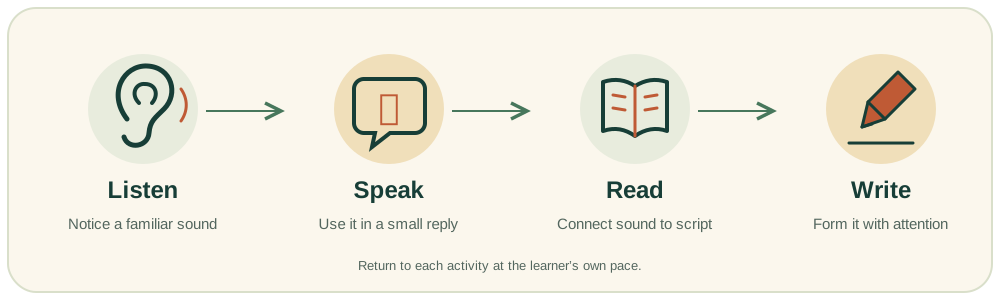
Listening, speaking, reading and writing support one another. This learning map is a way to find resources, not a fixed course timetable. A child who already speaks Telugu may begin with the script; a new speaker may first enjoy familiar words and short replies.
Keep the activity small
Choose one page and one task. Read the example together, let the child have a turn and stop while the activity still feels manageable. Printable sheets and interactive word activities are available without an account.
Choose a resource by the task in front of you
The learning hub is a directory of practical starting points. It does not require every visitor to begin with the same page or complete a set of lessons in a fixed order. Think about the task the learner is ready to try: finding a letter, understanding a word, reading a short line or making a written attempt. That question helps you choose a resource with a clear purpose.
A child who speaks Telugu at home may already know the meaning of a word and want to explore its written form. Another learner may need an object or picture before the word makes sense. The hub can support both enquiries by pointing to different resources. The teacher should discuss a class-specific sequence; the public directory is not an unconfirmed course timetable.
Use the alphabet pages for different kinds of questions
The alphabet page gives an overview of the script and a starter chart. Use it when the learner wants to see how the written system is organised. The Achulu page concentrates on independent vowels, while the Hallulu page focuses on consonant examples and comparisons. These pages have related subjects but different jobs.
If the learner can already recognise some letters and is looking at changing vowel forms, open Gunintalu. For joined consonant patterns in familiar words, explore Ottulu. There is no need to copy all four resources into one home activity. Choose the page that explains the feature you are actually trying to understand, then return to the hub when another question arises.
Move from a visible object to a useful expression
The words resource connects written Telugu with meanings and reading aids. It includes a small browser game for matching familiar meanings with choices. Use it when the task is identifying or recalling a word. The sentences page then shows expressions in context, so a learner can see how a known word participates in a short message.
These resources are not interchangeable with a complete conversation lesson. A word card provides one kind of support, while taking turns in speech asks the learner to do something different. A parent can choose a small example and ask a teacher how it relates to the current goal. If pronunciation is uncertain, use a fluent speaker’s model rather than assuming the English reading aid fully represents the sound.
Keep quantity, reading and writing goals separate
The numbers guide shows number words and numeral forms. A family can use it to talk about a small quantity without turning the activity into a handwriting exercise. Reading a number word, saying a number aloud and recognising a Telugu digit are related but distinct tasks. Choose which response you want to practise before asking the learner to do all three.
The same principle applies across the hub. A child may understand a sentence when it is spoken but need help reading it. They may read a familiar word but still need a writing model. The resource labels describe the task a page supports, not a judgement about the learner’s overall level. That distinction makes it easier to select a manageable example and discuss the next step.
Find actual practice, then decide how much to use
The reading page includes short material and a meaning question. The writing page explains how to approach a small written attempt, while the worksheet page provides files that can actually be opened and printed. A link labelled as a download should lead to a usable resource, not a promise that a file may be created later.
Select one task before printing or copying. A family does not need a stack of pages to make a short practice moment useful. Look at the resource’s instructions and consider whether the learner knows the meanings involved. If a task is too demanding, return to a simpler example or ask the teacher which part to revisit. The hub is designed for return visits rather than a single completion session.
Use stories and grammar for meaning as well as form
The starter story offers an original short passage with a meaning guide and a question. A story can give a familiar word a role in an event, even when an adult models most of the first reading. The grammar page uses small sentence patterns to explain what changes when a word is replaced. Neither page attempts to cover every text or rule.
Choose the support the learner needs. An adult can explain the situation, read a line naturally or ask the child to find one familiar expression. If the learner understands the event but cannot read the written form, that is a useful distinction to discuss. Avoid turning an original practice story into a claim about a school syllabus or treating a few grammar examples as a complete course.
Understand the limits of text-based sound support
The pronunciation resource explains how to use a spoken model alongside written examples. English labels can help a visitor orient themselves, but they do not capture every distinction in Telugu. The website does not provide recorded pronunciation audio or automatic speech scoring. A fluent speaker or teacher is needed when the task is checking how a sound is produced.
The browser quiz and word game check a small written-choice task. They do not listen to the learner’s voice, diagnose a difficulty or save a performance record. Keeping the activity’s role clear helps a family interpret the response accurately. A correct click can show recognition in that set of choices; it should not be presented as proof of general speaking ability.
Use the search field as a way back to a resource
The hub’s search field filters the visible resource titles and categories. Try a topic word such as vowels, reading or worksheets. If nothing appears, clear the search or try a simpler term. The filter works in the current page; it is not a search of private student records or a promise to return every possible Telugu resource on the internet.
Resource links remain available without signing in. If a page does not open, note the page title and return through the directory. You can report a specific broken link through the contact page without sending private learner information. The all-pages directory provides another route when the name you remember does not match the hub’s shorter label.
Keep a useful resource note for the next conversation
When a page raises a question for the teacher, record its title and the particular example involved. Explain what the learner tried and which support was available. This is more useful than saying that the child cannot do reading or that the entire resource is too easy. A concrete observation can help the teacher connect a home activity with a suitable class discussion.
Parents looking for ways to organise a home routine can visit the parent-guide directory. It owns the practical family questions, while this hub owns navigation to the learning materials themselves. Follow the link that matches your next task rather than expecting every page to repeat the same explanation. That keeps both the resources and the family’s practice easier to use.
Return to the hub as the learner’s question changes
The next useful page may be different after a little practice. A learner who began by noticing a letter might later want to read it in a word. Another may move from a word meaning to a question they can ask. Use those changes to choose a new resource or revisit an earlier one with a different purpose. There is no requirement to move forward through the directory after every visit.
The free materials can support exploration while a family considers a class, and they can provide examples to discuss with a teacher. They do not create an enrolment, reserve a place or define a paid-plan inclusion. If you want guided teaching, use the class information and enquiry routes. If the immediate goal is one small practice task, the hub gives you a direct place to begin.
BEFORE YOU DECIDE
A few questions, answered
No. The resources built into this website can be read and used without signing in.
They offer practice and examples. A teacher can help with pronunciation, writing movements and a learning plan appropriate to the learner.
Continue exploring
Keep learning. Keep asking.
Talk to Ravi
Let’s find a starting point.
Tell us the learner’s age, current Telugu familiarity and preferred class format.
Request a Free Demo